
One CV, Five AI Websites and the Design Intelligence They All Missed
The Frontend Reality Check: Why AI Builds Templates, Not Intentional Products.


This analysis was not part of the original plan. The experiment was supposed to end quietly. It didn’t.
The experiment 5 LLMs, 1 CV → 5 Websites was deliberately simple: we generated five websites from the same CV using five different large language models and handed you, the readers, the power to decide which one deserved to win. Our experiment was exactly about how an average person who needs a website - business owner e.g. photographer, lawyer, doctor, electrician etc. who just wants simple online presence and knows nothing about coding and AI can get with it.
The start of the experiment: How I Became Guinea Pig for LLM Website Building
The deep dive: Five LLMs Tried To Build A Website. ChatGPT Failed. The Model That Shipped Was The Biggest Surprise.
The outcome: The end of 5 LLMs championship, the Votes are In
At that point, the experiment was complete. Or so we thought.
One comment, however, stayed with me.
It reframed the entire exercise—not from the perspective of AI capability, but from the standpoint of professional web craftsmanship.
I understand the provocation behind “frontend developers will be the first to go”, but the five websites shown actually demonstrate the opposite.
All five outputs — Gemini, Claude, Kimi K2, MiniMax and ChatGPT — share the same core limitation: they generate generic structures with generic visual patterns, lacking hierarchy, coherence, and any true personalization to the professional profile. They resemble Wix-level starter templates, which are perfectly fine for amateurs, but far from what counts as professional web presence.
Professional frontend work isn’t about stitching HTML blocks together.
It is about:
• crafting visual identity
• ensuring legibility and narrative flow
• establishing focus, contrast, hierarchy
• adapting design to a persona, a market, and a positioning
None of the five sites fulfils these criteria. They simulate a website, but they don’t create a designed one.
These LLM outputs are good as rough drafts, but they still need a designer’s eye, a frontend developer’s structuring, and a human sense of the client’s narrative. So rather than signalling the end of frontend work, they highlight precisely what AI still cannot automate: design intelligence.
It was not a critique of individual models or code quality.
It was a diagnosis of a deeper blind spot: the absence of hierarchy, narrative intent, and design intelligence.
That observation was a reality check I couldn’t ignore.
To understand whether we had reached a genuine milestone or merely a high-tech plateau: I invited a professional frontend designer our co-author Artemii to analyze the results of the experiment. We are no longer looking only at what the AI built, but at what it was structurally unable to see.
What follows is a structured analysis, starting with the first- and second-place winners.
A Professional Designer’s Perspective:
Artemii Savchuk’s expertise is in front-end development and interface implementation building production-ready web UIs with React/TypeScript, integrating REST APIs, and translating UX requirements into reliable, maintainable code. In this chapter, he analyzed the two AI-generated websites produced by the winning AI Models.
Method & Scope
Before looking at individual websites, a brief note on how this analysis was conducted.
Scope and consistency
The same CV was used across all five websites.
All websites were evaluated as generated, without manual redesign, layout restructuring, or visual refinement after generation.
Minor prompt-level clarifications during generation do not constitute human design intervention and were applied consistently across models.
What is evaluated
The analysis focuses on professional frontend and design criteria, including:
Visual hierarchy and layout logic
Readability
Information structure
Narrative flow
Conversion flow
Responsiveness
Brand identity
Meaning density
No excessive decoration
What is not evaluated
Model reasoning or prompt engineering quality
Backend implementation or performance
SEO optimization
Copywriting quality as a standalone discipline
Perspective
The perspective is qualitative and grounded in real-world frontend and design practice.
The goal is not to rank models, but to assess whether the resulting websites meet the standards of professional web presence.
With that framework in place, the evaluation was done for 2 top-ranked website.
Explanation of design evaluation criteria
Visual hierarchy and layout logic: Clear visual and information hierarchy: what is primary and what is secondary on the page. Proper use of headings, spacing, and font sizes so the structure is readable at a glance.
Readability: Text is easy to read: large enough font size, good contrast between text and background, and fonts that feel comfortable. Content should be easy to scan, with key points highlighted.
Structure: Logical layout of the site and sections. Navigation is intuitive, sections follow a natural order, and users can find what they need without effort thanks to a thoughtful block arrangement.
Narrative: A coherent story told through content. The website should not just list facts, but guide the visitor through a clear storyline: who the specialist is, what value they provide, what problems they solve, and why they can be trusted.
Conversion flow: How well the site leads users toward action: a clear primary CTA, a smooth path to contact or inquiry, presence of a form, calendar, or clear contact scenario, minimal friction, and an obvious “what happens next”.
Responsiveness (mobile-first as a 2024–2025 trend): The site should work and remain readable across devices (desktop, tablet, smartphone). Here I evaluate visual readiness and potential risk areas in structure and content volume, even without deep testing on every device.
Conciseness: No unnecessary content. Pages should not feel overloaded with text or graphics that do not add value. A restrained style that communicates the essence is preferred.
Brand identity: A distinctive and recognizable look. Brand colors, typography, and visuals that match the person and positioning. The site should feel unique, not like a generic template.
Meaning density: Every block should have a purpose. Less filler, fewer “sections because it’s common”, and more relevance: each section should answer the question “why does the user need this?”
No excessive decoration: Decoration should not exist for decoration’s sake. Functional design is the trend: no pointless animations or noisy effects. Any visual detail should improve clarity or strengthen the brand.
I treat responsiveness as “visual readiness and risk spots”, without a lab-level test across all devices.
Analysis of the Winner #1: Claude Opus 4.5
What Claude did well:
Clean modern style. The site produced by Claude looks visually polished. The single-page structure feels cohesive: blocks (about, services, experience) are placed in a logical order and share a consistent style. The design is minimal, modern, and professional-looking. Based on feedback, this version appeared the most “finished”.
Strong readability and content presentation. The page is easy to read: fonts are large enough, contrast is solid, and the text is broken into paragraphs and lists. It feels like the model tried to refine the page. Information comes in measured portions instead of one massive wall of text. Key points stand out, so the page is easy to scan. Overall, it looks clean and readable.

Claude site hero section (clean, modern styling and strong readability) Consistent tone and color palette. The model followed a defined color scheme, which creates a stronger sense of coherence and branding. Headings and buttons stay consistent, with no random colors or conflicting styles. For a generated design, this is a real advantage.

Visual consistency across sections (palette, typography, components) Soft interactive touches. Claude added light interaction: smooth scrolling through menu anchors, subtle animations when sections appear during scrolling. These details make the page feel modern and alive without distracting from the content. This kind of balance is often hard for beginners, but the model handled it well.


Where Claude fails:
Weak contact mechanics. Visually, the site feels confident, but when it comes to lead conversion, everything relies on a basic mailto link. Yes, there is a CTA button, and technically you can contact the person, but this is the most fragile scenario: it depends on the user’s email client, offers poor UX, does not collect structured data, and performs badly on mobile. There is no contact form, no calendar booking, and no clear “submit an inquiry” flow. In the end, the site feels more like a beautiful showcase than a tool that reliably converts visitors into leads.

Limits of a single-page format. Everything is placed on one page. The structure is linear, but there is so much biography and project detail that the single-page approach starts to break. The “Experience” section turns into a long list of roles and credentials that is uncomfortable to scroll through. Valuable information gets lost in the stream. The model did not solve how to structure a large content volume: separate pages, collapsible lists, or at least some UX compression. The result is a long page that feels like a scroll-heavy document. On mobile this becomes even worse: long lists and sections turn into endless scrolling without meaningful pauses, and the user loses focus faster.
Template-like presentation. The design is pleasant, but it lacks personality. It follows the standard landing page formula: hero block, services section, experience section, and so on. Nothing is wrong with it, but nothing feels distinctive either. The specialist’s identity is weak: the photo and resume text are there, but the brand character is missing. It feels like the model followed a generic “how to build a professional website” recipe rather than thinking about how to make this specific person stand out.
Potential maintenance issues. Technically, Claude generated everything inside one HTML file. That makes deployment easier, but it hurts scalability and long-term maintenance. Adding new pages or restructuring the design without splitting into modules will be harder. For a one-off result it is not a deal-breaker, but from a front-end perspective the architecture is not mature.
Claude produces a strong first impression: clean visuals, consistent styling, readable typography, and small interaction details that make the page feel modern. But the weaknesses are not cosmetic, they show up exactly where a real product begins: conversion mechanics, content scalability, and a clear user journey. In other words, the design looks “finished” on the surface, yet it behaves like a well-made template rather than a solution built around a specific person and business goals. So the problem is not that the layout is “bad”. The problem is that it’s default. The site reads like a polished template: it looks finished, but it doesn’t make decisions about what matters most, how to compress content, and how to lead a visitor to action. That’s where the imitation becomes visible.
Where the model imitates design instead of building a product
The blocks exist, but it is not always clear why a user needs each block. That lowers meaning density. This is where Claude’s “template behavior” becomes obvious: it knows what a consultant website usually looks like, and it arranges the content using familiar patterns: standard icons and competency cards, typical service grid, generic “About” structure.
One detail makes it even clearer: in a key section, there is no personal photo, only a neutral card with credentials (Ph.D., university, languages). The layout looks like a placeholder waiting for a human touch, but personalization never happens.
The core issue stays the same: this is not thoughtful design built around a real person, it is a copy of an averaged template. The model does not decide what matters most for this profile and how to package it. Instead of turning achievements into a story, it simply retells the CV as bullet points. The LLM acts like a template engine: it uses ready-made blocks and fills them with text without asking deeper questions or designing a conversion path.
This leads to serious omissions. The contact flow is handled in the most formal way possible: the CTA goes to mailto. Technically it is “contact”, but practically it is fragile. It depends on an email client, it is inconvenient for mobile users, and it does not function as a lead capture process. This is not “designer minimalism”, it is simplification that becomes obvious as soon as the website is expected to convert.

The model behaves as if the site is “done” because it looks clean and informative, while forgetting the main goal: guide the user toward action. That is what imitation looks like. The shell of a professional website is there, but the real user journey is not designed. Claude built a showcase that looks nice but is not strong enough as a conversion tool.
What is expected from a professional
Implement missing functionality. A front-end developer would add proper interaction first: a real contact form, CTA that leads to a clear action, and a usable conversion flow. Without this, the landing page is not valuable for business.
Optimize the structure around the user. A designer would review the content volume critically. Some sections could be moved to separate pages (for example, a detailed resume as a PDF or an “Experience” page). The narrative would be improved: instead of listing every job, highlight 2–3 strong case studies, and hide the rest behind “Show more” or a similar UX pattern.
Add personality and brand identity. The visual identity needs work. A designer could introduce a distinctive visual element, a recognizable graphic accent, refine the logo, or improve the imagery so the site becomes memorable. Right now it is simply “good”, but it should represent a personal brand.
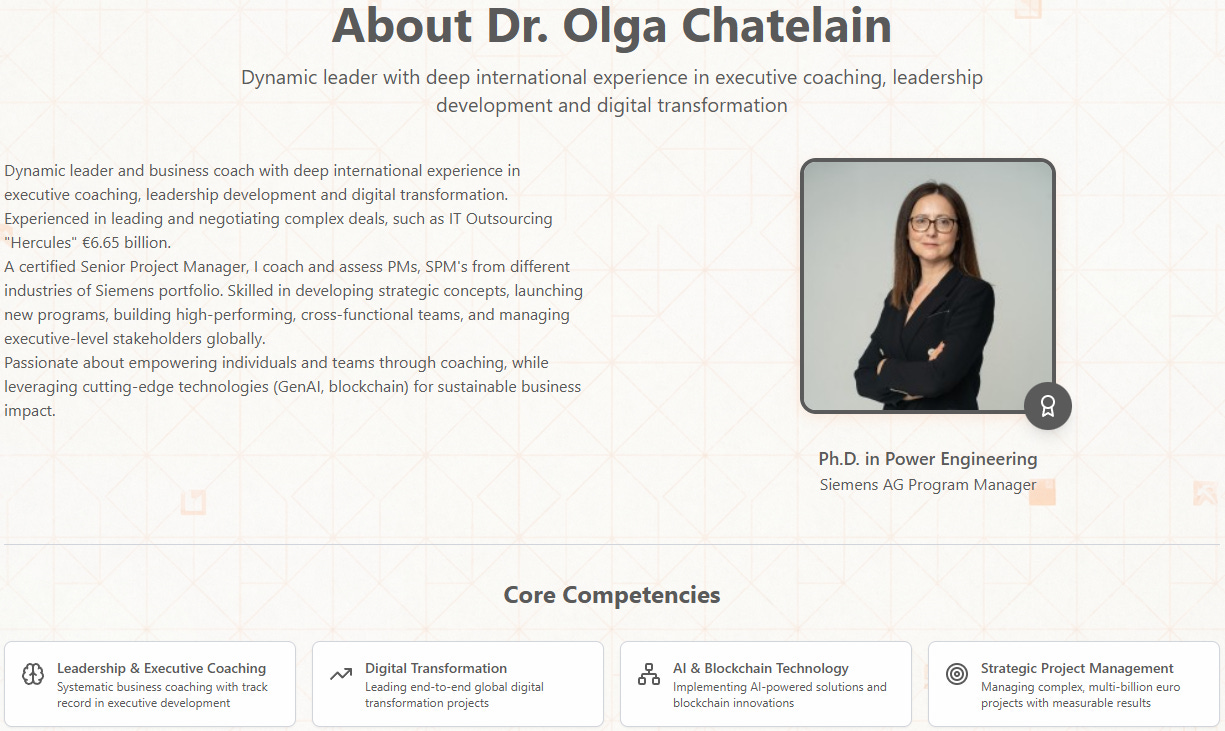
Add personality and brand — the page feels generic despite good structure Clean up the code. A front-end developer would split styles and scripts into separate files and remove unnecessary parts. That improves maintainability. They would also test cross-browser behavior and responsiveness to ensure nothing breaks. Without manual QA, AI-generated code can hide small but critical bugs.
Handle legal and SEO essentials. The site may need legal pages (privacy policy, cookie consent, if it will be used publicly). An SEO specialist or front-end developer would add metadata, proper H1/H2 structure, alt text for images, and other basics that make the site readable for search engines and AI agents. Note: we did not evaluate SEO as part of this review, so this is a baseline checklist rather than a scored conclusion.
Conclusion for Claude: strong as a visual showcase with solid readability, but weak as a funnel. As long as the contact flow relies on mailto and there is no real path to inquiry, the site cannot reliably convert interest into action.
Analysis of the Winner #2: MiniMax
What MiniMax did well
Structure and navigation: MiniMax built a clear single-page structure with separate sections and a usable menu. The navigation items are standard for a consultant website: Home, About, Expertise, Services, Experience, Contact. Because of this, the site does not feel like one endless text block. It reads step by step, and the user can jump directly to the section they need. A nice detail: the menu highlights the active section, so it is easier to track where you are while scrolling.
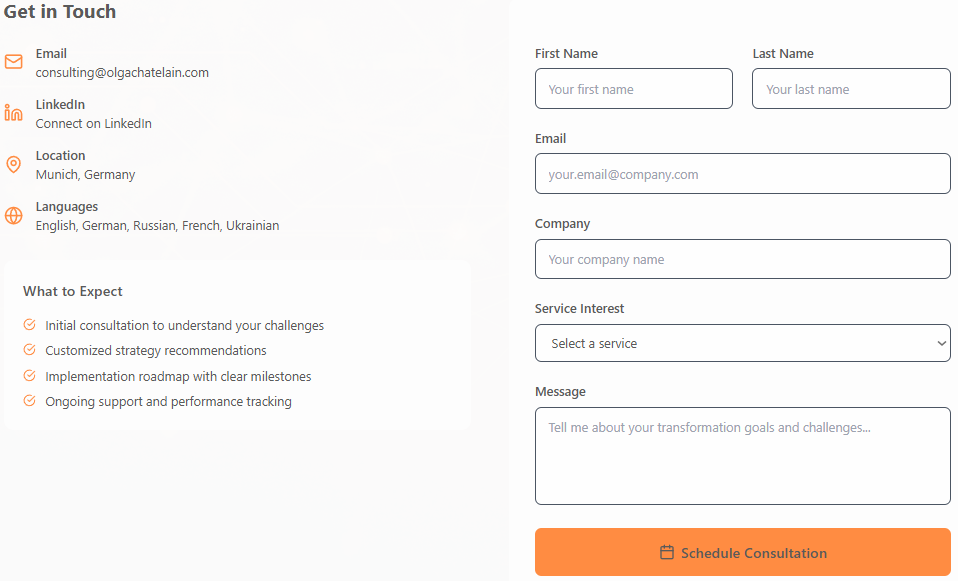
Contact as a real scenario: The Contact section includes a complete form: fields for first name, last name, email, company, a service dropdown, and a message. Even if we evaluate it only as a generated interface and do not check the back-end, the form already solves conversion better than mailto. It is a real lead flow, not “email me if everything aligns”.
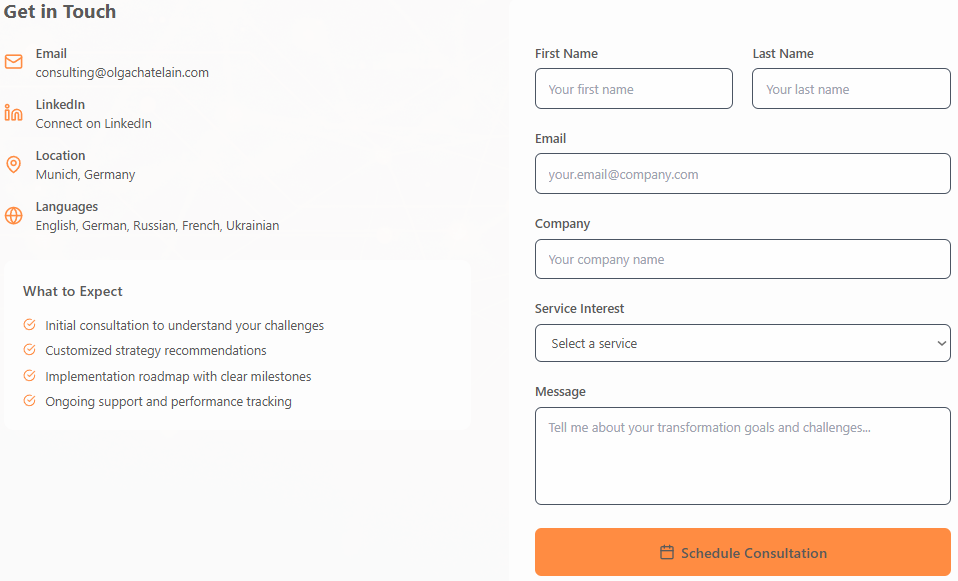
Contact as a real scenario: structured form (name, email, company, service interest, message) Resume content is organized neatly: Experience, education, skills, and competencies are not dumped into one block, but split across sections. The About section is written as first-person text. It is not deeply personal, but it reads like a real introduction rather than bullet points. Expertise and Services descriptions are also reasonably precise and not overly “fluffy”. The model tries to stay close to the resume meaning and the consultant format.
An attempt to follow basic front-end conventions: The overall build shows an effort to match common standards: logical section order, a footer with copyright, and a structure that does not break the narrative flow. MiniMax does not reinvent the wheel, but it creates a functional framework with a familiar logic.
Where MiniMax struggles
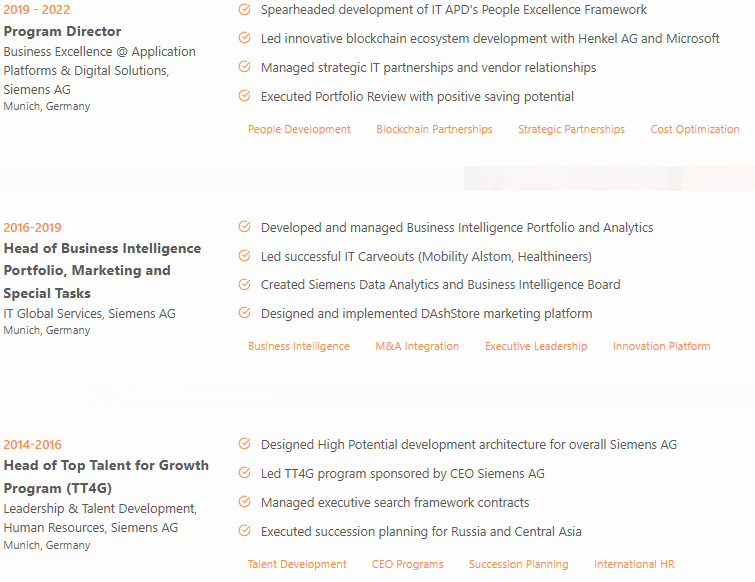
Heaviness and overload. The downside of “including everything” is that the site feels bulky. There are too many sections for a personal website. The “Experience” section becomes a massive wall of text with every job and achievement listed. Meaning density suffers, and the user cannot easily see what matters most. The model cannot prioritize, it simply outputs everything it found. Without editorial cleanup, this overload will push visitors away. On mobile it is even worse: people often never reach the form because they get tired of scrolling and lose the structure.
Unoptimized code and performance. The MiniMax site works, but the code feels heavy. The markup is verbose and sometimes excessive. It likely includes duplicated styles or inefficient patterns. For example, the form functionality feels supported by more JavaScript than necessary. There is a risk of unnecessary weight in code and assets. The AI did not focus on optimization the way a human would: images are not compressed, extra scripts remain, CSS is not minified. Modern websites depend on speed and efficiency, and this version does not feel lightweight.
Template legal blocks and placeholders. MiniMax added an Impressum section, but it still contains placeholders like “[street], [city]” and other empty template strings. It looks like “completeness imitation”: the section exists, but the site is not actually finished. Claude shows a similar issue, so this is more of a systematic generation flaw than a single-model mistake. Users notice placeholders instantly, and trust drops.
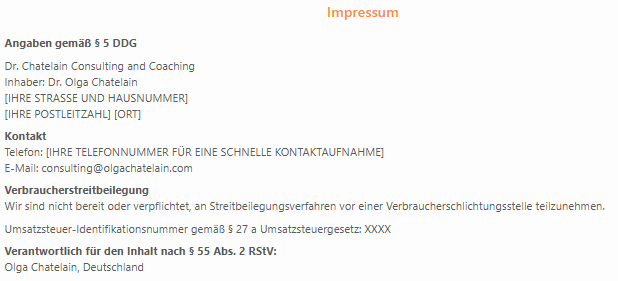
“Completeness imitation”: Impressum exists, but still contains placeholder fields Imperfect visual design. Some visual effects look like noise. They do not strengthen hierarchy or improve scanning. Overall, MiniMax looks less polished than Claude. Spacing is inconsistent in places, typography is not fully refined, and the final designer-level finishing touch is missing. For example, the huge bullet list in Experience feels aggressive and monotonous, with no visual cues to guide the eye. The style is coherent, but too basic: it lacks the small details that separate professional web design from a simple layout.
MiniMax feels more “product like” than Claude in one key area: it actually attempts a real conversion scenario through a contact form and clearer navigation. But the same pattern appears on the next level -not in how the site looks, but in how it thinks. Instead of prioritizing, compressing, and shaping a focused story, the model tries to include everything at once: more sections, more text, more “mandatory” blocks. That makes the site heavier, less confident in hierarchy, and easier to break trust with obvious placeholders. This is where the design stops being deliberate and starts to look like imitation.
Where the model imitates design instead of building a product
MiniMax clearly shows the limit of “design imitation”. The model knows what a “serious” website should include, and it tries to add everything: blog, Impressum, all possible sections. It feels like a hard-working student who applied every piece of advice without judgment.
A good example is the Blog section. It exists because “modern specialists have blogs”, but the model did not consider whether it is needed or whether there is content. Without posts, the blog is an empty shell that takes up space in the menu.
Another example is the Impressum with placeholders: the model copied a mandatory element for German websites without understanding the context, since it did not have real data.
The same happens with the resume content: the LLM imitates a content manager and blindly copies everything. A human designer would ask a different question: what experience is most relevant to show here? AI does not think strategically. It does not filter or highlight. It mirrors the input data without a presentation strategy.
Yes, the site is technically “done”, sections exist, but they do not necessarily support the goal. MiniMax created a template with full stuffing, but did not design the user journey: what to show first, what to emphasize, what to simplify. That is the difference between imitation and real product thinking.
What is expected from a professional
Content review and cleanup. A designer-editor would go through the entire content with a red pen. Cut what is excessive, move details into a portfolio or PDF, turn some text into visuals. The goal is to remove informational overload and keep the core message. Users will not read fifteen bullet points for every past job. A professional would choose a better format, like a career timeline with a couple of key achievements instead of a full list.
Optimize and lighten the build. A front-end developer would clean the technical side: optimize images, remove unused code, minify CSS and scripts, split code into modules, and remove duplicates. The goal is faster loading and stability. Right now the site “works”, but it feels fragile. A specialist would make it fast and reliable.
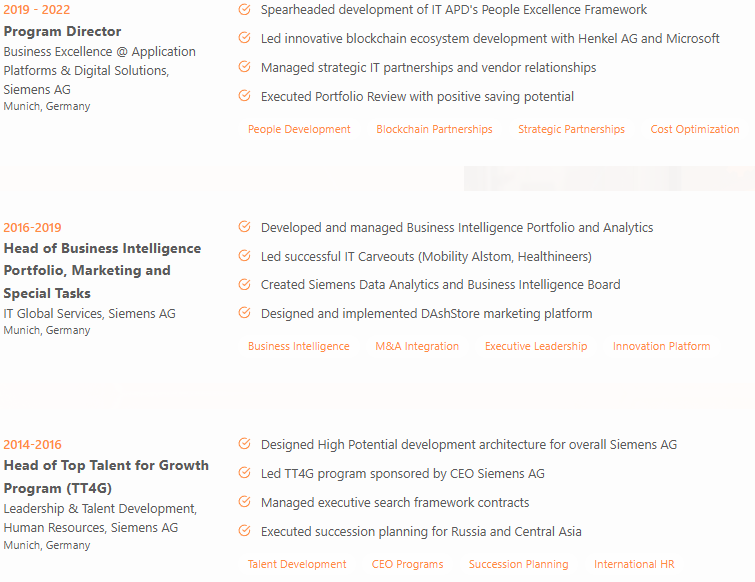
Performance risk example: long, scrollable experience blocks (needs cleanup and simplification) Refine design and UX. A professional designer would fix visual issues, align spacing, add icons or illustrations where needed, and break overly long lists into tabs or collapsible blocks. UX work matters too: add CTAs in logical places so the visitor does not leave without taking action. Every screen should lead toward contact or inquiry, and a designer ensures that flow.
Test responsiveness and cross-browser behavior. Even if the site claims to be responsive, manual testing is still required. Some blocks may break on mobile, or text may look too small on a 4K monitor. A front-end developer would fix this with media queries. They would also verify that forms actually submit data and, if needed, add analytics. Without a human, these details are rarely fully polished by AI tools.
Сonclusion for MiniMax: the conversion path is stronger thanks to the form, but overload and placeholder content hurt trust and hierarchy. Without content cleanup and visual system refinement, this is still a draft, just one that looks “closer to a product”.
Scalability and long-term potential
Claude built a simple single-page site. It works well as a skeleton: adding blocks and editing content is easy, less code means fewer breakpoints. But this advantage only holds inside the same format. Once you want a real blog, case studies, separate pages, or growth logic, you will need to rebuild it manually or essentially generate it again. There is no modular system for expansion, only a clean shell.
MiniMax produced a richer structure: more sections, a form, and a stronger “product-like” feel. On paper, it looks more ready for growth. In practice, it is more fragile: more layers, more places where things can break, and more generation-related redundancy. Adding new content becomes riskier. Either you run the model again and risk unpredictable changes, or you manually dig into the code. For a simple personal site, it is often too much.
Final scalability take:
Claude is simpler and more predictable for “horizontal” content growth, but it hits a ceiling quickly and needs redesign once the site must evolve into a real product. MiniMax feels more functional out of the box, but expanding it is more expensive and risky without an experienced front-end developer. In both cases, AI gives a fast start, but it does not build a growth-ready system. A human still does.
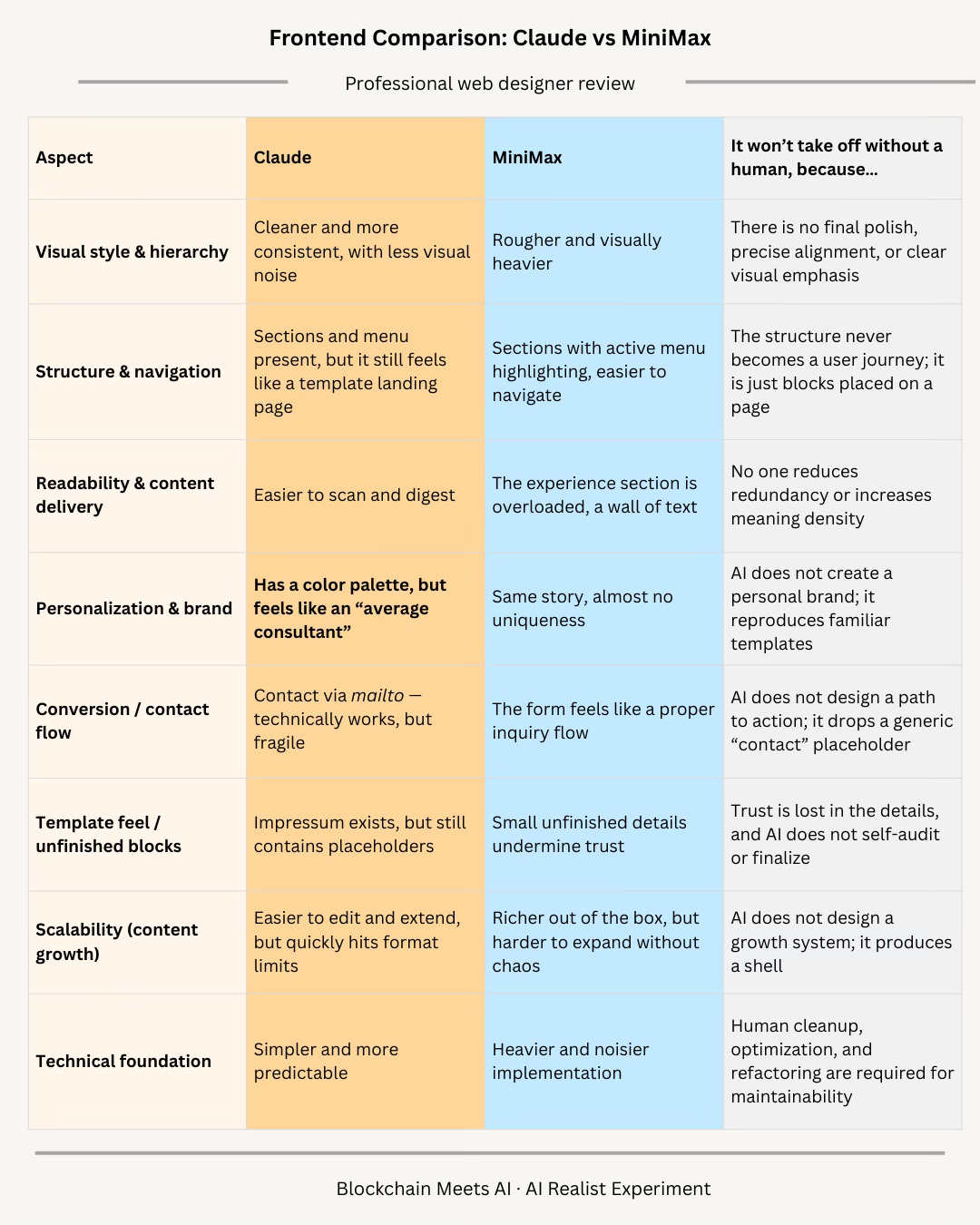
Comparison table
Summary
Both versions are solid drafts, but neither one is a finished product. Claude wins in visual clarity and that “premium landing page” feel. MiniMax wins in practicality, because it offers a proper contact flow right away through a form and makes navigation slightly easier with section guidance (highlighting the active menu item).
But in both cases, this is still a generated showcase, not real design thinking. The AI takes a resume and spreads it across familiar blocks, but it does not solve the key problems: what should be shown first, what can be removed, how to package the value into a story, and how to lead the user to action.
That is why you still need a designer and a front-end developer to build the system: narrative, priorities, conversion path, and a scalable structure that can grow with new content.
Conclusion
LLMs can genuinely build websites fast. Layout, sections, styling, basic markup, and sometimes even a visually pleasing result can be produced in minutes. The problem is not that AI “can’t design”. The problem is that AI does not make product decisions.
A model can generate a shell and place content into familiar patterns, but it does not decide what truly matters for this person and this audience. It does not set priorities, build a flow, or treat conversion as a process. That is why it often becomes design imitation: it looks professional, but it lacks what turns “pretty” into “effective”.
What a designer does that an LLM does not
cuts the excess and increases meaning density
builds a narrative and clear focus instead of listing a CV
creates a visual system around a personal brand, not an average consultant template
tests assumptions: where to guide the user and what action they should take
What a front-end developer does
turns generated code into something maintainable
fixes small details that break UX (responsiveness, spacing, anchors, forms)
optimizes speed and reliability
turns interaction into a working scenario (not mailto as “contact”, but a real inquiry flow with logic and handling)
This experiment shows one simple truth: AI speeds up the start. But a real product begins later, exactly where you need to think, choose, and take responsibility for the outcome.
That is why without a human, these sites stay “good drafts”: they look fine until the moment you need to grow them, add content, strengthen the brand, and turn them into a tool that reliably converts visitors into leads.
The main lesson: a neural network is a draft production tool. An expert is the one who turns a draft into a product.
AI can generate websites.
What it still cannot do is decide what matters.
This experiment did not signal the end of frontend work.
It clarified its value.
If you enjoyed this deep dive, consider subscribing. You’ll get every new edition delivered straight to your inbox, completely free.